Before contacting Technical Support, it is strongly advised to have registered the 9000SMZ in question using the QR as described in Section 4 to access all on-line support material.
When contacting Campden Instruments for technical support, it is helpful to have the following information available:
| Necessary information | How to find this information |
| A description of the fault | What screen or function is used at the time of the fault. |
| Instrument model and Serial Number | On the CE label at the rear the instrument or navigate to Menu - Information, See Section 16.1. |
| Main (MX) and User (UX) firmware number | Navigate to Menu - Information, See Section 16.1. |
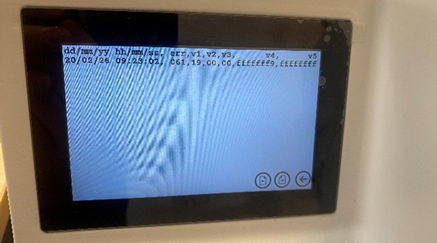
| Provide the current Error given and Error Log (Photo) | Navigate to Menu - Information - Error Log, See Section 21.2. |
| If possible, provide a video of the fault. | Please email/send a link to your support contact. |
Please note that technical Support can only help with queries relating to the instrument function. Queries regarding instrument application should be directed to the sales department at Campden Instruments or the local sales agents.
21.1 Error Codes
| 1 | Advance limit switch error, both limits active |
| 2 | Stage limit switch error, both limits active |
| 3 | User to main checksum error - major |
| 4 | Advance drive position error |
| 5 | Advance drive IC error |
| 6 | Advance drive over torque error |
| 7 | Advance Encoder clockwise no signal |
| 8 | Advance Encoder anticlockwise no signal |
| 9 | Stage drive IC error |
| 10 | EEprom machine data load error |
| 11 | Stage drive position out of range |
| 31 | Blade drive IC error |
| 32 | Blade drive overshoot error |
| 33 | Blade drive overload error |
| 34 | RTC not running |
| 35 | Power on timer read write error |
| 36 | Blade on timer read write error |
| 37 | Stage datum update error |
| 38 | Advance datum update error |
| 39 | Opti-Cal connection problem |
| 61 | User to main checksum error - minor |
| 101 | Main to user checksum error - major |
| 161 | Main to user checksum error - minor |
| xxx | EEprom user setup data load error |
All error codes are dated and logged.
The error log can be found from the Information screen by pressing 'Error Log'.
The machine can hold up to four screens of log entries.
Please take a picture of these screens and send them to Campden Instruments to further aid diagnostics (see image below).