 button.
Ensure the bath is loaded, see section 12.
The instrument will move the bath and blade to the 'Home' position. 'Home' positions the blade in line with the rear edge of the selected specimen holder and the stage moves to a convenient height (this height can be preset). The instrument will enter the Move Screen.
The purpose of the Move screen is to get to the start of a slice faster using gross movement of the Advance and Stage axis. Once the blade is in place, the precise slicing can take place. 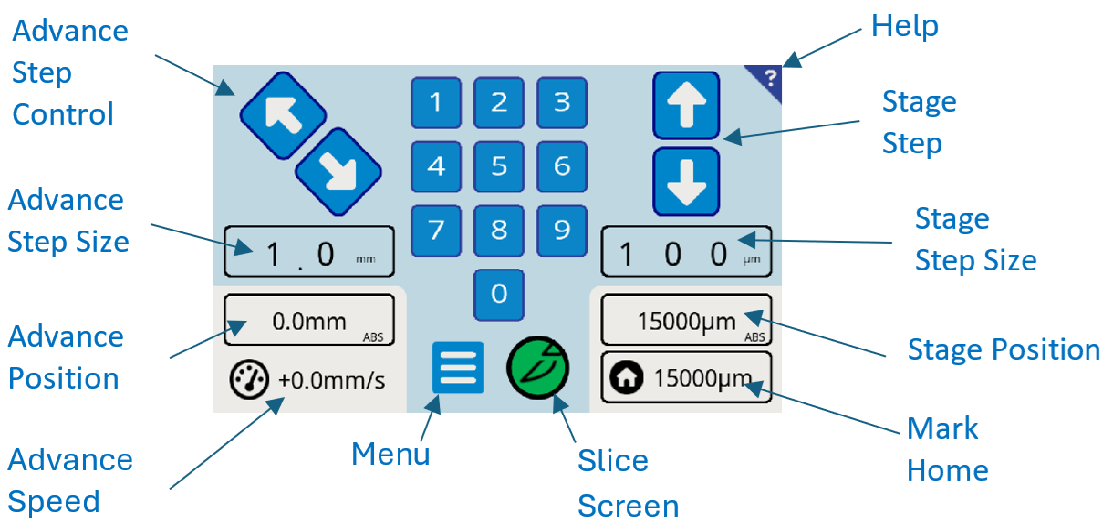
 The Move screen and keypad
Positioning of the Stage (Tissue Mount) and Advance (blade edge) may be achieved in a combination of two ways:
Step Method: (Using Touchscreen buttons)
- Press the Step Size button on the Touchscreen
- Enter the Step Size via the central number-pad in the centre of the touchscreen.
- Use Step Control buttons to move the desired Advance and/or Stage to the desired position.
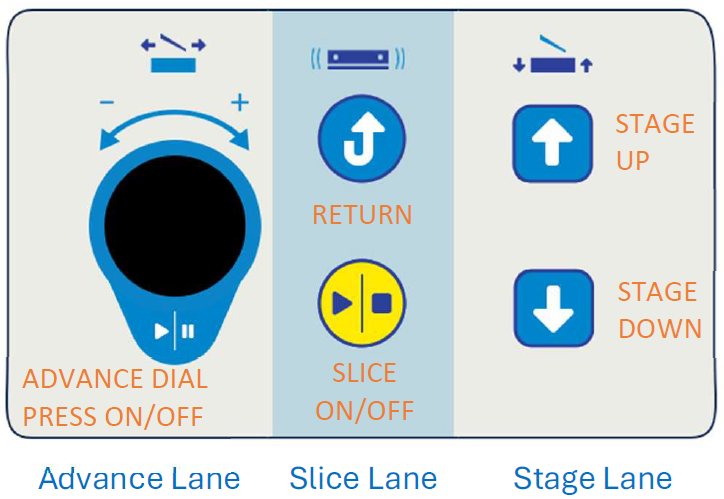
Continuous Method: (Using the Keypad controls)
- Move the Advance position using the Rotary dial. Rotate to select speed, and then momentary press the Rotary Dial to toggle start/stop. The Advance speed may be adjusted whilst the blade edge is in motion or stationary.
- Move the Stage position using the Up / Down buttons. Press and hold to move, release to stop.
The positions of the Advance or Stage may be read from the "position" buttons; pressing the position button toggles between Absolute position (ABS), and Incremental (INC):
Advance Position
ABS: the distance of blade edge from the rear edge of the specimen holder. Selecting the Advance Position Window toggles the display to INC, showing the blade edge position relative to any user defined position. To set this user datum, whilst the position button is displaying INC, position the blade edge as required and select the  button.
Stage Position ABS: distance from the
top face of Tissue Mount to the blade edge. Selecting the Stage Position Window
toggles the display to INC, showing the blade edge position relative to any user
defined position. To set this user datum, whilst the position button is
displaying INC, position the Specimen holder as required and select the button.
In the Incremental position mode, the position can be zeroed to better visualize and plan the movement trajectory.
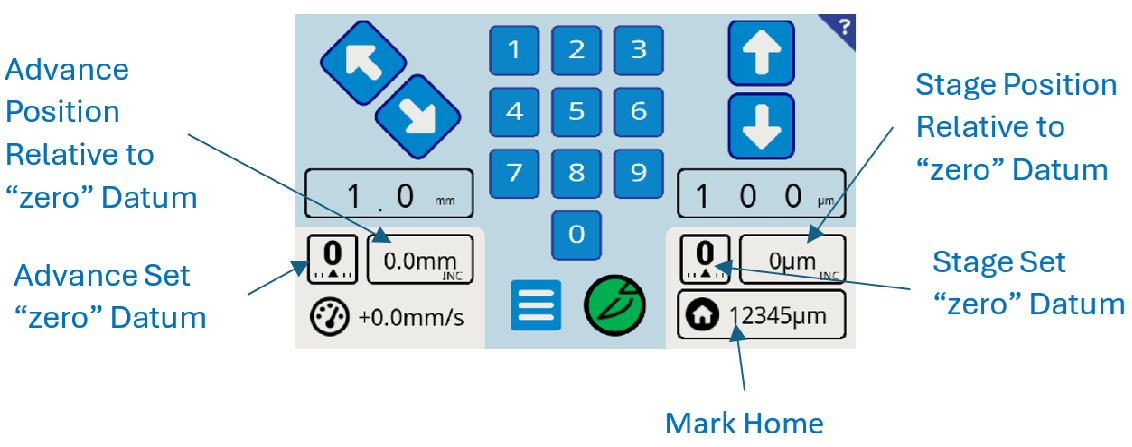 The Move Screen with both axis set to INC
Mark Home (Optional) - select  button to save the stage position for the next slice. When loading the bath, this will be the new default position the stage will rise to. The ‘Home’ stage position can be saved to the user profile either
on exit of this screen or via the CUSTOM screen.
button to save the stage position for the next slice. When loading the bath, this will be the new default position the stage will rise to. The ‘Home’ stage position can be saved to the user profile either
on exit of this screen or via the CUSTOM screen.
When the desired position of the blade edge relative to the tissue specimen has been found, select the  slice button to proceed to the Slice Screen (see
section 14). From the slice screen it is possible to return to the Move Screen at any point by selecting Advance position or Stage position. To update the Custom Setup Changes to the HOME position and the Step move values, press and hold the
slice button on exit.
slice button to proceed to the Slice Screen (see
section 14). From the slice screen it is possible to return to the Move Screen at any point by selecting Advance position or Stage position. To update the Custom Setup Changes to the HOME position and the Step move values, press and hold the
slice button on exit.